Egocentric & Exocentric Video Data Collection App
How to Collect First- and Third-Person Video at Scale with HaiCrowd
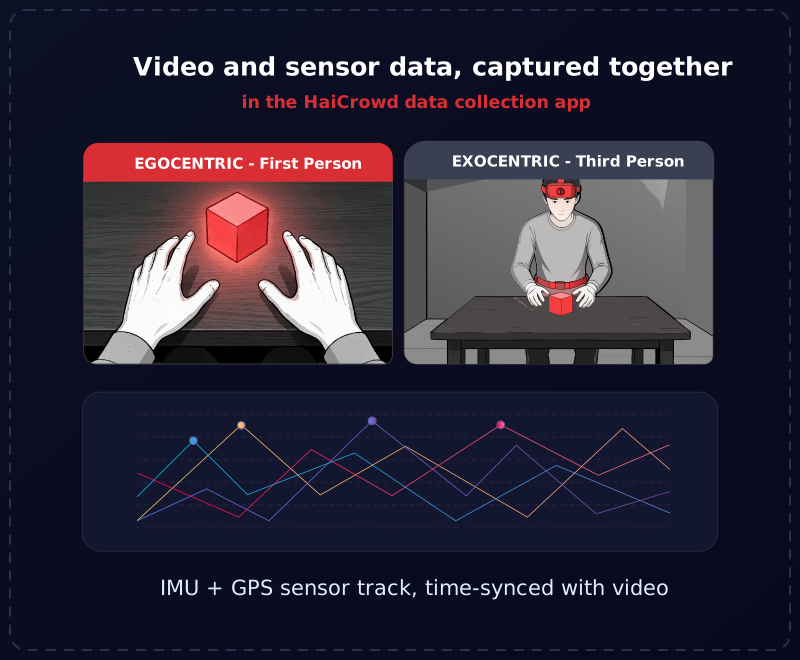
Egocentric and exocentric video are two of the most in-demand data types in robotics and embodied AI right now. The hard part is almost never the idea. It is the logistics: getting many collectors, in different places, to record the same task the same way, with consent handled, quality checked and the footage safely delivered.
That is an operations problem, and it is exactly the kind of problem a purpose-built data collection app is meant to solve. It is also why teams work with established data collection companies in India like HaiData. A quick reminder of the terms before we get into the workflow: egocentric is first-person, POV video from a camera worn by the actor; exocentric is third-person video from a camera positioned outside them.
For the full background on what the two viewpoints capture and why models want both, see our guide to egocentric vs exocentric datasets. This article is about the practical part: how you actually collect them with an app.
How to Collect Ego/Exo Video Data with HaiCrowd in Five Steps
HaiCrowd is HaiData's AI data collection app and platform: a mobile app for Android and iOS paired with a web dashboard. Here is the end-to-end workflow for a video collection project, from setup to delivery.
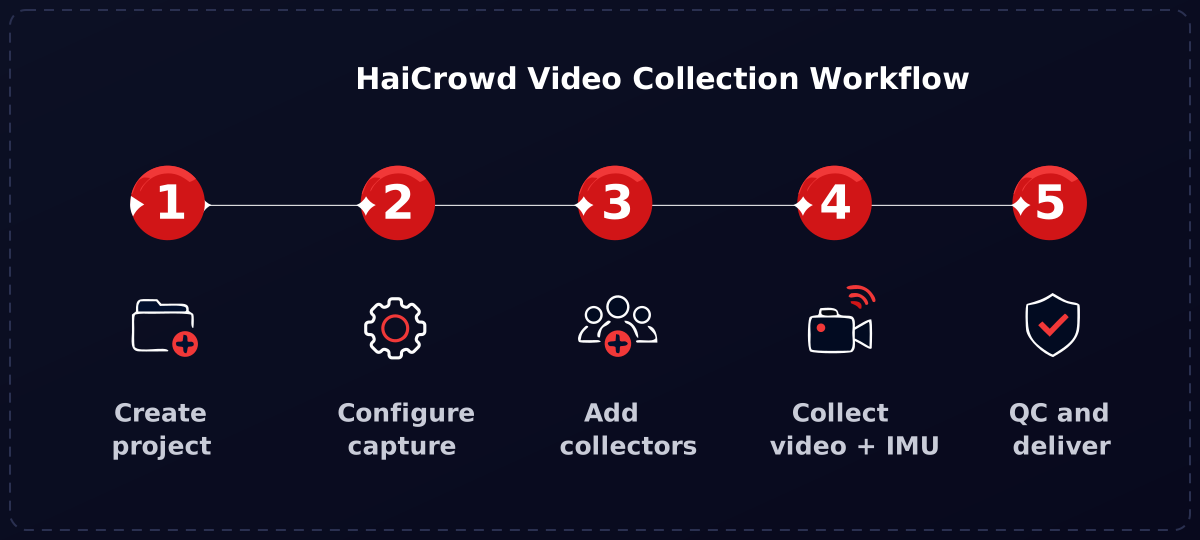
1 Create a video collection project
Start on the HaiCrowd dashboard and create a new project for the video you want. This is where the whole project lives: its capture spec, its collectors, its QC rules and its storage all hang off this one project, so everyone works to the same definition.
2 Configure the capture properties
Set the video properties (frame rate, resolution and so on) directly on the project. For a multimodal capture you can also fix the audio properties (sampling rate, bits per sample, channels). Because these are set on the dashboard and not on each device, every collector records to the same spec, and configuration drift across dozens of phones simply cannot happen. You also point the project at your own cloud storage here and define any custom metadata fields you want collected.
3 Add collectors and choose where to launch
Add users to the project manually, or mark it as an open project so anyone can join and start contributing. When you launch, you can select the specific countries the project runs in, which is how you build geographically diverse ego/exo data and keep collection aligned with where you are allowed to operate.
4 Collectors log in and capture
Collectors open the app, select the project, and start recording. For egocentric footage that is a head or chest mounted phone recording the first-person view; for exocentric footage it is a phone on a stand recording the same task from outside. The app works in offline mode, pre-fetching the project so collectors can record with no connection and upload when the network returns, and it captures participant consent (name and signature) on the device for any human-subject footage. For projects that need motion data, it also logs the phone's sensors (IMU and GPS) time-synced with the video, covered in more detail below.
5 QC reviewers approve or reject
QC users on the platform review each video against your quality bar and the project requirements, and approve or reject it. QC is live and multi-level: you decide how many levels there are, who owns each one (your team, the vendor, or your own org), and what percentage each level reviews. Approved video uploads to your own cloud storage and is permanently deleted from the phone, and collectors see the approve or reject status of their uploads through a live audit report.
Why Use a Data Collection App Instead of Ad-Hoc Capture
You can collect ego/exo video without a dedicated app, using stock camera apps, a shared drive and a spreadsheet. It works for a pilot with five people. It falls apart at scale, and the failure modes are always the same. An app built for collection closes each of them:
- One spec for everyone. Capture settings are enforced from the dashboard, so all footage matches the requirement instead of arriving at fifty slightly different resolutions and frame rates.
- Metadata that is generated, not typed. File name and size, phone model, OS version and media properties are recorded automatically; collectors only fill the custom fields you defined, which keeps the dataset queryable.
- Your data, your storage. Footage goes straight to your own cloud in the geography you choose and is deleted from the device, so you own it from the first upload and stay on the right side of data-residency rules.
- Quality caught early. Live QC finds problems while the participant is still available, which is the difference between a quick retake and an expensive re-collection.
- Resilient to bad networks. Offline mode means the hardest, most valuable collection environments are not blocked by patchy connectivity.
The underlying idea is simple: put the configuration in the dashboard and the enforcement in the tooling, so scaling from five collectors to five hundred does not scale your quality problems with it. Beyond video, HaiCrowd handles Audio, Image, Text, PDF and Email collection the same way, so a multimodal project stays on one platform.
Capture Synchronized Video and Sensor Data
For embodied AI and robotics, egocentric video is often only half the signal. The other half is motion: the head and body dynamics that video captures worst, precisely because of the blur and occlusion that make first-person footage hard. That is why the landmark egocentric datasets do not ship video alone. Ego4D and Project Aria record inertial data (accelerometer, gyroscope, magnetometer, barometer) time-aligned with every frame, and robot-learning rigs routinely pair first-person RGB with an IMU so a policy can learn orientation and movement from a human demonstration.
HaiCrowd captures that motion alongside the video. The phone's own sensors (accelerometer, gyroscope, magnetometer and GPS) are logged during a recording and delivered as a sensor track next to the footage in your own cloud, so an egocentric dataset arrives with both the view and the movement behind it. No extra hardware is needed, because the sensors are already in the device.
One phone, one clock, tight synchronization
The hard part of fusing video and sensor data is time alignment, because separate devices each keep their own clock and drift apart. HaiCrowd sidesteps it: the video and the sensor streams come from the same phone on the same clock, so they are aligned to the millisecond by construction. That is what makes a single phone a genuinely capable egocentric capture rig, not just a camera.
Data Collection Apps for Egocentric & Exocentric Datasets
There is no single "app store" category for ego/exo collection, so the real choice is between four broad approaches. Here is how they compare, and where a purpose-built collection app fits.
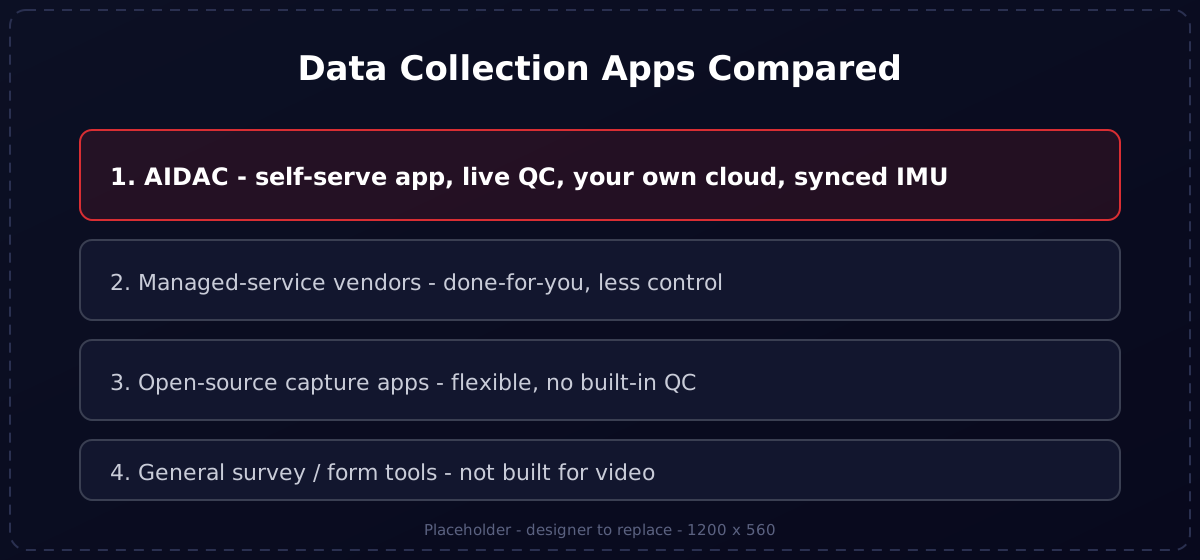
| Approach | What it is | Quality control | Where the data lands | Best for |
|---|---|---|---|---|
| 1. HaiCrowd (HaiData) | A self-serve data collection app plus dashboard, with configurable video capture, in-app consent and offline mode. | Live, multi-level QC built in, with per-level owners and review percentages. | Directly in your own cloud, in your chosen geography, deleted from the device. | Teams that want to run and own ego/exo collection at scale with quality enforced in the tooling. |
| 2. Managed-service vendors | A supplier runs the collection for you end to end. | Handled by the vendor; visibility and control vary by contract. | Delivered as a drop at milestones, on the vendor's schedule. | One-off briefs where you would rather outsource the whole operation than run it. |
| 3. Open-source / research capture apps | Community or lab-built capture tools for wearable and phone video. | Little to none out of the box; you build the QC pipeline yourself. | Wherever you wire it up to go. | Research teams with engineering capacity and non-standard sensor needs. |
| 4. General survey / form tools | Generic data-capture and form apps adapted to collect media. | Form validation, but not media-aware video QC. | The tool's storage, typically not built for large video. | Light, low-volume capture, not high-volume ego/exo video. |
How to choose
If you want someone else to own the whole thing, a managed service is the answer, and HaiData offers managed AI data collection services too. If you want to run collection yourself, keep control of the spec and own the data from day one, a self-serve app is the better fit. Judge any option on four things: can you enforce capture settings centrally, add collectors quickly, QC while collection is still running, and deliver to storage you control. HaiCrowd is built around exactly those four.
Frequently Asked Questions
Collect Your Ego/Exo Video Data with HaiCrowd
Egocentric and exocentric video are hard to collect not because the recording is hard, but because doing it consistently, at scale, with consent and quality handled, is hard. A data collection app moves that work into the tooling. You set the spec once, add your collectors, and get consistent, consented, QC-passed footage in your own cloud.
Explore the HaiCrowd data collection platform to run your own project, or if you would rather we run the collection for you, see our managed data collection services.
To scope an ego/exo video collection project with HaiCrowd, write to info@haidata.ai
Get in touch
For support and query:
Email us at info@haidata.ai
Ainnotate Data Technologies LLP
Prestige Tranquilty,
Budigere Cross,
Bangalore - 560049
Karnataka, India.
Sree Nagammal Bldg.
Manjoor,
The Nilgiris - 643219,
Tamil Nadu, India.




© 2026 | All Rights Reserved | Privacy Policy
HaiData is an AI Data solutions and services organization catering to the AI data needs of various industries. Started with the objective of contributing to "Data Centric AI", HaiData has invested in all aspects of the AI Data value chain - including services, technology and solutions. As an organization committed to providing jobs for technically qualified youth, who chose to work from rural places rather than cities, HaiData provides affordable AI Data related solutions and services to organizations across the world from the villages of Nilgiris hills, in India.